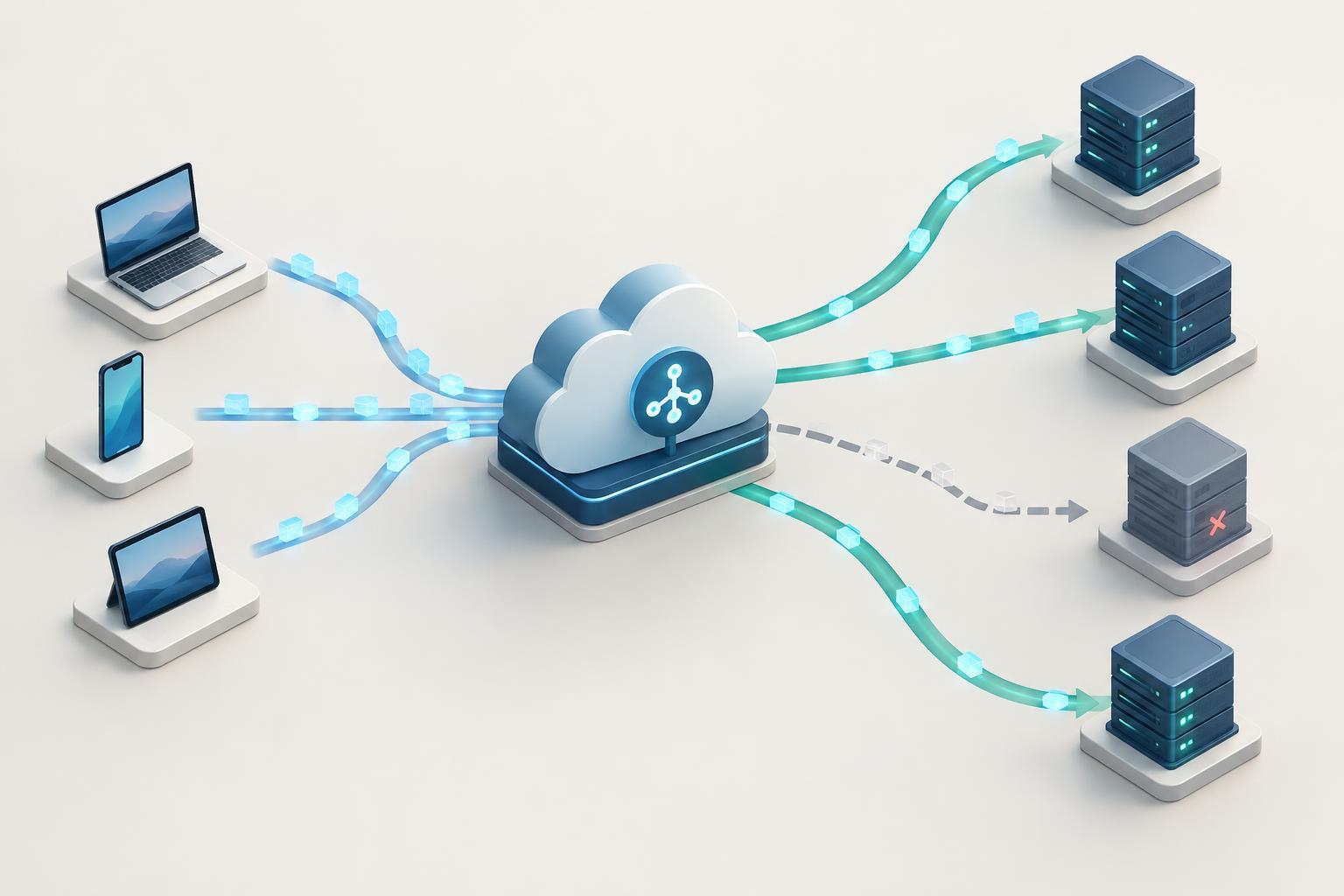
The request path: one entry point, many destinations
Imagine an application running on three servers. If users connect directly to one server and it becomes unavailable, those users may lose access even though the other two are working. A load balancer provides a shared entry point in front of the servers. Clients connect to its address, and it forwards traffic to a destination in a pool, often called a backend or target group.
A typical path is client → load balancer → application instance → load balancer → client. The load balancer does not make the application faster by itself. Its main job is to direct incoming work toward available capacity. In a cloud platform, it may also offer a stable endpoint while application instances are added, removed or replaced.
Distribution is not always perfectly even. One request might take milliseconds while another occupies a connection much longer. The balancer can decide where to send traffic, but each destination still needs enough computing capacity, database access and network bandwidth to do the work.
What information does the balancer use?
Load balancers commonly operate at two levels. A transport-level balancer routes connections using information such as IP addresses and ports. It can be a good fit when traffic needs straightforward connection forwarding. An application-level balancer understands a protocol such as HTTP and can make decisions using a hostname, URL path or request header. For example, it might send requests for /images to one service and /api to another.
The selection rule within a destination pool matters too. Round robin cycles through destinations. A least-connections approach tends to favor destinations with fewer active connections. Some configurations allow weights, giving one destination a larger share of new traffic than another. The best choice depends on the workload: counting connections may be less informative when requests vary greatly in cost.
It helps to distinguish connection distribution from request distribution. With a long-lived connection, several requests may travel through the same connection rather than trigger a fresh destination choice each time. When checking whether traffic is balanced, look at how your particular balancer handles the protocol and connection type, not just at a request count.
Health checks and failure handling
A balancer needs a way to avoid sending new work to an instance that is not ready. Health checks probe each destination, often at a specified port or HTTP path. If a destination fails the configured checks, the balancer can stop selecting it until it passes again. This is useful during restarts, deployments and some kinds of failure.
A good health endpoint answers a narrow question: can this instance serve the traffic it is about to receive? A check that only confirms a process is running may miss an application that cannot handle requests. A check that depends on every downstream service, however, may take all instances out of rotation during a shared dependency failure. Choose what to test based on which failures an individual instance can recover from or route around.
Health checks are not a guarantee that every request will succeed. A destination can fail between checks, and requests already in progress may still be affected. Teams can reduce disruption by allowing instances to finish existing work before removal where supported, and by testing how their application behaves when a destination disappears.
Connections, sessions and encryption
Many HTTP applications work best when any healthy instance can handle the next request. If session data exists only in one instance’s memory, sending a later request elsewhere may appear to log a user out or lose their progress. Session affinity, sometimes called sticky sessions, can keep a client associated with a destination for a period, but it does not protect that session if the destination fails. Shared session storage or stateless application design is often more resilient.
A load balancer may terminate TLS, decrypting client traffic before forwarding it to a backend. This can simplify certificate management and enable HTTP-aware routing. The connection from the balancer to the backend is a separate leg; it may need its own encryption, depending on the deployment and security requirements. Make the expected traffic path explicit rather than assuming encryption on the client-facing leg covers the entire route.
Applications may also need the original client address or scheme. Because the backend receives a connection from the balancer, it might otherwise see the balancer as the peer. Supported forwarding headers or platform features can provide that context, but the application should trust it only when the request has come through the intended proxy.
A practical way to plan and observe distribution
Start by identifying the entry point, the destination pool and the rule that selects a destination. Then ask what happens when an instance is added, becomes unhealthy or is removed during a deployment. A simple test environment with two instances that return distinct instance names can make the routing path visible without requiring a complex application.
Once deployed, inspect both balancer and application signals. Useful observations include the number of healthy destinations, requests or connections per destination, response times and error rates. If one instance consistently handles more work, investigate routing rules, session affinity, long-lived connections and differences in instance capacity before assuming the balancer is broken.
Finally, remember what the balancer cannot solve. It may keep traffic away from a failed application instance, but it will not remove a database bottleneck, fix an expensive request or create unlimited capacity. Treat it as one part of a system: an entry point that makes routing and replacement manageable, paired with applications that can tolerate changing destinations.


